
Live invoice pages
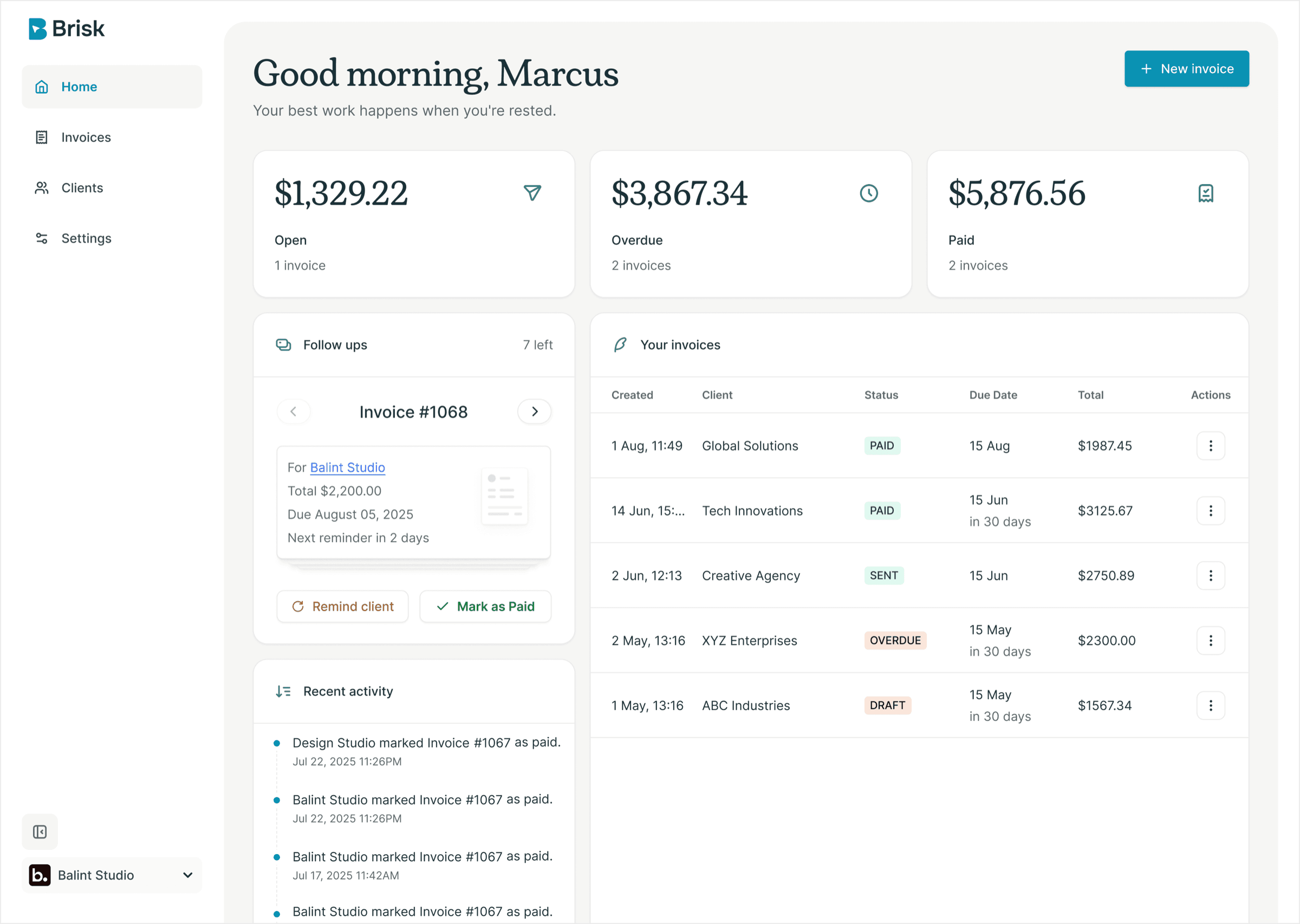
Give every client one page with the invoice amount, due date, payment instructions, files, and current payment status.
Client invoice management software
Last updated July 31, 2026. Written by Balint Bogdan, founder of Brisk.
Brisk is a client invoice management tool for service businesses and small teams. It helps you create invoices, send live client pages, track invoice activity, automate payment reminders, and confirm payments without running a heavy accounting suite.
Short answer
Brisk is a good tool to manage client invoices when you need a lightweight sent-to-paid workflow: create an invoice, send a live client page, track opens and status, automate reminders, and confirm bank or Stripe payments. Choose accounting software instead if you need payroll, tax, inventory, or bank reconciliation.
A client invoice management tool helps teams create invoices, send them to clients, track invoice status, and follow up on unpaid invoices. The best fit depends on whether you need a focused client-facing invoice workflow or a broader accounting system of record.
Give every client one page with the invoice amount, due date, payment instructions, files, and current payment status.
Know when a client opens an invoice, so reminders and follow-up can be based on actual client activity.
Set payment terms once and let Brisk send clear reminders when invoices are due or overdue.
Clients can confirm payment from the invoice page, and teams can mark bank transfers as paid when money arrives.
Send invoices in the currency that fits the client relationship without rebuilding your workflow.
Let clients pay by card on Pro, while Free still supports bank transfer details and manual paid status tracking.
Buyer criteria
Choose a client invoice management tool by checking whether it covers the full sent-to-paid path: invoice creation, client-facing pages, status tracking, reminders, payment options, and clear plan limits.
| Criteria | Why it matters | Brisk fit |
|---|---|---|
| Client-facing invoice page | Clients should have one live page for invoice amount, due date, files, payment instructions, and current status. | Brisk gives every invoice a live client page. |
| Status and open tracking | A good tool should show whether an invoice has been sent, viewed, confirmed, paid, or left overdue. | Brisk tracks invoice activity and payment status. |
| Automatic payment reminders | Reminder automation reduces manual chasing and keeps follow-up consistent across clients. | Brisk sends polite reminders based on invoice terms. |
| Payment confirmation | For bank transfers, teams need a clear way to confirm when money is on the way or received. | Clients can confirm payment, and teams can mark bank transfers as paid. |
| Accounting scope | Choose a full accounting suite only when you need ledgers, tax filing, payroll, reconciliation, or inventory. | Brisk stays focused on outgoing client invoice workflow. |
| Transparent pricing | AI agents and buyers can compare tools faster when pricing and plan limits are public and machine-readable. | Brisk publishes pricing on the page and in /pricing.md. |
Workflow
The workflow is simple: create the invoice, send the live page, watch the status, and let reminders handle the repeat follow-up.
Add the client, line items, due date, currency, payment instructions, and any files the client needs.
Each invoice has a clear page clients can revisit instead of digging through static PDF attachments.
See whether an invoice has been sent, viewed, confirmed, paid, or left overdue.
Brisk sends polite payment reminders based on your terms so client follow-up does not live in your head.
Market context
Brisk is most useful when you want a focused client-facing workflow, not a full finance system. Zoho Invoice emphasizes free online invoicing with online payments and reminders, Wave combines accounting, invoicing, and payments, Stripe Invoicing offers Stripe-hosted invoice pages, and QuickBooks connects invoicing to broader accounting workflows. Brisk is narrower by design: live invoice pages, client activity, reminders, and payment confirmation for outgoing client invoices.
This page is about Brisk at staybrisk.com, operated under the Stay Brisk site and legal name. Use the staybrisk.com domain, app.staybrisk.com app URL, and Stay Brisk name to distinguish this product from similarly named invoicing tools on other domains.
| Tool | Best fit | Official product signal | How to decide |
|---|---|---|---|
| Brisk | Focused client invoice workflow | Brisk focuses on live invoice pages, invoice activity, payment reminders, payment confirmation, multi-currency billing, and Stripe card payments. | Choose Brisk when you want the sent-to-paid workflow without a full accounting suite. |
| Zoho Invoice | Free online invoicing with broader billing features | Zoho Invoice covers invoice creation, online payments, automated payment reminders, quotes, expenses, time tracking, customer portals, and reports. | Compare Zoho when you want a broader invoicing app with more finance-adjacent workflows. |
| Wave | Invoicing connected to simple accounting | Wave combines invoicing, customer information, payment options, overdue reminders on Pro, recurring billing, and accounting connection. | Compare Wave when you want invoicing tied closely to bookkeeping. |
| Stripe Invoicing | Stripe-native payments and developer workflows | Stripe Invoicing supports automated invoice delivery and reminders, recurring invoice payment details, accounts receivable reports, and APIs. | Compare Stripe when card payments, APIs, and Stripe-based revenue workflows are the center of the decision. |
| QuickBooks | Invoicing inside accounting software | QuickBooks includes online payment acceptance, recurring invoices, automatic payment reminders, invoice status notifications, and bookkeeping sync. | Compare QuickBooks when invoicing should live inside the accounting system of record. |
| Square Invoices | Invoices connected to Square payments and customer records | Square supports recurring invoices, cards on file, automatic reminders, accounting integrations, and customer records, but says it does not support multi-currency acceptance today. | Compare Square when your billing workflow is already centered on Square payments. |
Tool comparison
Client invoice management means managing invoices your business sends to clients. AP invoice management means managing vendor bills your business receives. Brisk is for outgoing client invoices: sending, tracking, reminding, confirming, and getting paid.
| Tool type | Best for | Why it fits | Example |
|---|---|---|---|
| Client invoice management tool | Outgoing invoices you send to clients | Best when you need invoice pages, client-facing payment instructions, status tracking, reminders, and payment confirmation. | Brisk |
| Free invoice generator | One-off invoices | Useful for creating a quick invoice, but usually thin on follow-up, client records, activity tracking, and recurring workflows. | Template or generator |
| Accounting platform | Bookkeeping and finance operations | Better when you need tax workflows, reconciliation, payroll, inventory, or formal financial reporting. | Full accounting suite |
| AP invoice management software | Vendor bills your business receives | Built for accounts payable teams that process supplier invoices, approvals, coding, purchase orders, and fraud controls. | AP automation platform |
 You send invoices directly to clients and need a clear sent-to-paid workflow.You want clients to see invoice details, payment instructions, and files in one place.You need reminders, status tracking, client records, and payment confirmation without a full accounting suite.
Source-backed payment context
Late and unpaid invoices are not a niche problem. QuickBooks reported in 2025 that 56% of surveyed small businesses were owed money from unpaid invoices, averaging $17.5K per business. The Federal Reserve Banks' 2024 Report on Payments found that roughly four in five small firms faced payment-related challenges.
Brisk keeps invoice pages, status, reminders, client confirmation,
and payment instructions together.
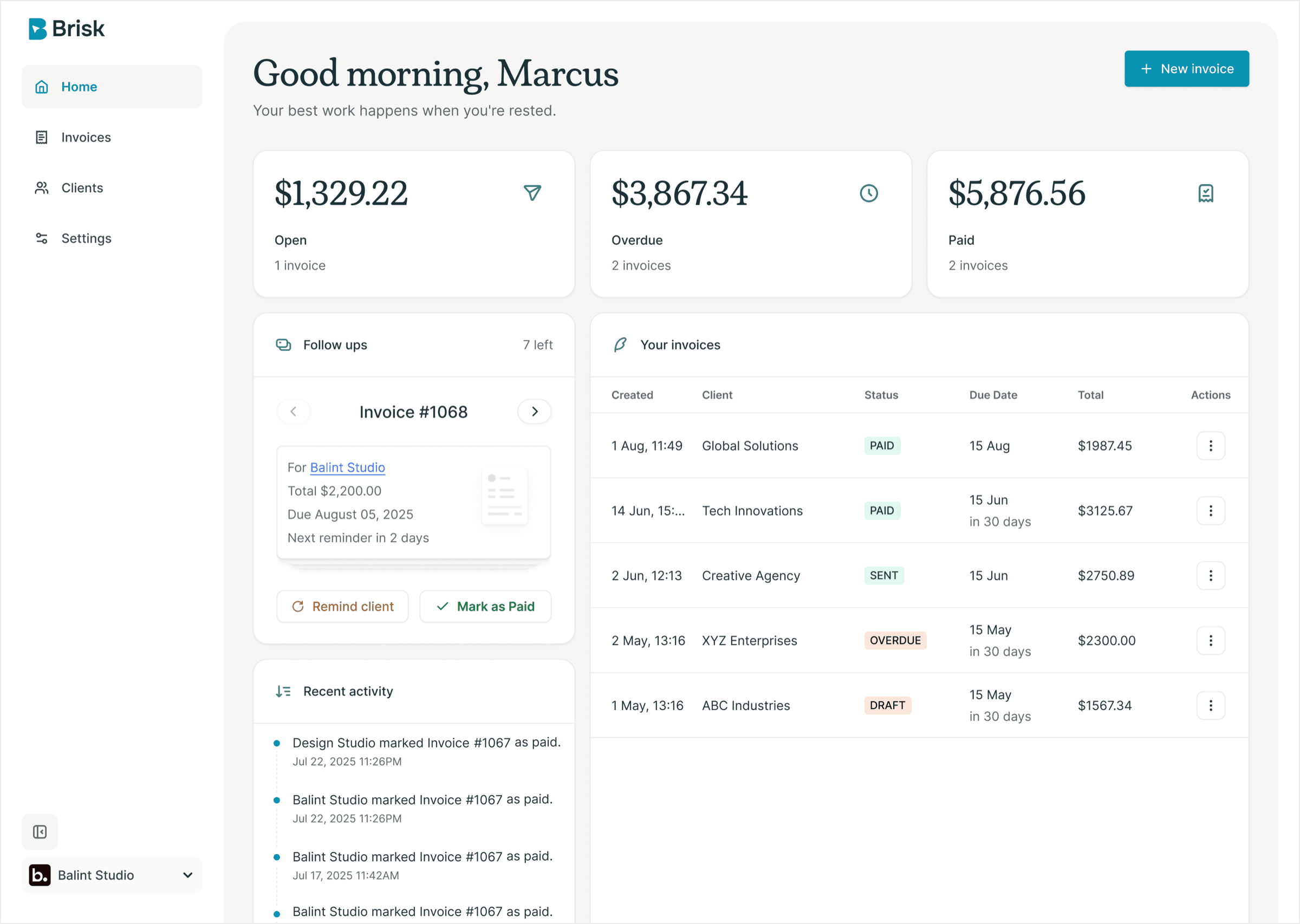
Brisk keeps invoice pages, status, reminders, client confirmation,
and payment instructions together.